> ## Documentation Index
> Fetch the complete documentation index at: https://www.adaline.ai/docs/llms.txt
> Use this file to discover all available pages before exploring further.
# Build datasets from logs
> Turn production spans into dataset rows for regression coverage
Production logs contain the cases your agent actually sees: real inputs, real model responses, tool context, evaluator results, cost, latency, and metadata. Add useful spans to [Datasets](/docs/datasets/overview) when you want future prompt versions to remember those cases.
This is the bridge from observability to regression coverage: a real span becomes a row, the row gets evaluators, and future prompt versions are checked against the same evidence.
 ## Find the right evidence
Start from the signal:
| Signal | Where to look |
| ------------------------------- | ------------------------------------------------------------------------------------------------ |
| A chart moved | Open [Monitor charts](/docs/monitor/analyze-log-charts), then drill into traces for the time window. |
| A customer report arrived | Filter [Traces](/docs/monitor/analyze-log-traces) by timestamp, name, reference ID, or safe metadata. |
| A Behavior repeated | Open [Behaviors](/docs/behaviors/overview), then inspect representative trace evidence. |
| An evaluator failed | Filter by evaluator result and inspect the model span. |
| An Improve cycle needs coverage | Add representative spans before or after review so the case is durable. |
Do not add every trace. Good datasets are curated: each row has a reason to exist and a clear expectation.
## Add a span to a dataset
Use [Traces](/docs/monitor/analyze-log-traces), [filters](/docs/monitor/filter-and-search-logs), or [Deep search](/docs/monitor/deep-search) to find representative production evidence.
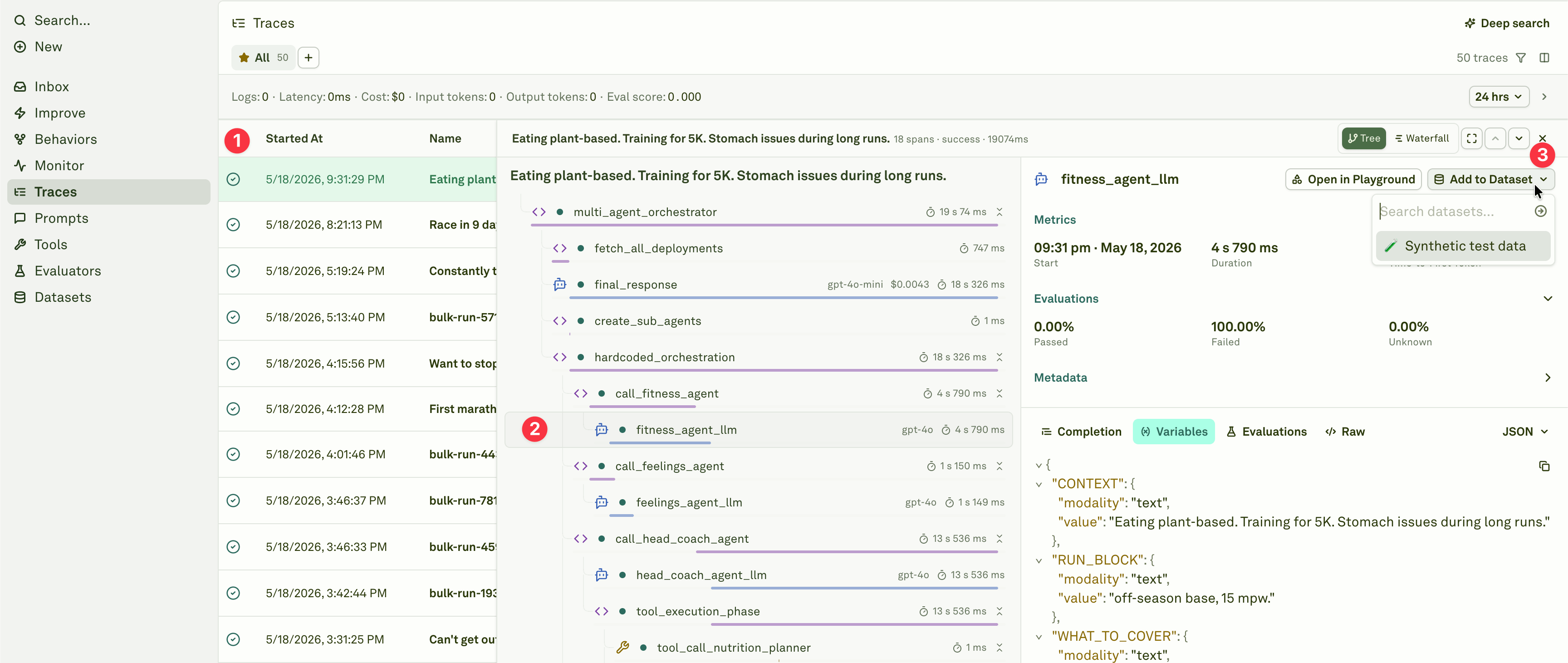
Open the trace and select the model span that contains the useful input, variables, response, and evaluator results.
Use **Add to Dataset** from the span details panel. Add the span to an existing compatible dataset, or use an empty dataset that Adaline can bootstrap.
Confirm variable values, response content, labels, and metadata before using the row as regression coverage.
Add or update evaluators so the row can pass or fail future prompt versions.
## Dataset compatibility
Adaline can add selected model spans to datasets when the dataset can accept the span variables.
A dataset is valid for selected spans when:
* It belongs to the same project.
* It is empty, with no rows and no columns, so Adaline can bootstrap columns.
* Or it already contains columns for all variables present in the selected model span.
When Adaline bootstraps an empty dataset, it can create columns from span variables and include a response column.
## What gets copied
For model spans, Adaline can copy:
* Prompt variable values.
* The model response, when a response column exists or the dataset is being bootstrapped.
* Text values.
* Image and PDF references when represented as URLs, hosted paths, or data payloads.
* Complex values serialized as JSON when needed.
The resulting row keeps the dataset source as trace-derived evidence. Review the row after adding it; production data often needs cleanup before it becomes a release gate.
## Make the row useful
After adding a row:
* Remove sensitive or unnecessary production content.
* Add labels or notes that explain why the row matters.
* Add expected output or pass criteria when needed.
* Attach evaluators that can score the case.
* Keep regression datasets focused by behavior, workflow, prompt, or release risk.
## Use the dataset in the loop
Trace-derived rows are strongest when they become part of a repeatable release check:
1. Monitor, Traces, or Behaviors surface an issue.
2. Representative spans become dataset rows.
3. Evaluators define what good looks like.
4. Improve proposes candidate prompt changes.
5. Reviewers approve only when the candidate handles the production case without breaking coverage.
Inspect model, tool, and orchestration spans before choosing what to preserve.
Organize rows used for evaluation and regression coverage.
Score the cases you preserve from production.
Use coverage and Behavior evidence in improvement cycles.
## Find the right evidence
Start from the signal:
| Signal | Where to look |
| ------------------------------- | ------------------------------------------------------------------------------------------------ |
| A chart moved | Open [Monitor charts](/docs/monitor/analyze-log-charts), then drill into traces for the time window. |
| A customer report arrived | Filter [Traces](/docs/monitor/analyze-log-traces) by timestamp, name, reference ID, or safe metadata. |
| A Behavior repeated | Open [Behaviors](/docs/behaviors/overview), then inspect representative trace evidence. |
| An evaluator failed | Filter by evaluator result and inspect the model span. |
| An Improve cycle needs coverage | Add representative spans before or after review so the case is durable. |
Do not add every trace. Good datasets are curated: each row has a reason to exist and a clear expectation.
## Add a span to a dataset
Use [Traces](/docs/monitor/analyze-log-traces), [filters](/docs/monitor/filter-and-search-logs), or [Deep search](/docs/monitor/deep-search) to find representative production evidence.
Open the trace and select the model span that contains the useful input, variables, response, and evaluator results.
Use **Add to Dataset** from the span details panel. Add the span to an existing compatible dataset, or use an empty dataset that Adaline can bootstrap.
Confirm variable values, response content, labels, and metadata before using the row as regression coverage.
Add or update evaluators so the row can pass or fail future prompt versions.
## Dataset compatibility
Adaline can add selected model spans to datasets when the dataset can accept the span variables.
A dataset is valid for selected spans when:
* It belongs to the same project.
* It is empty, with no rows and no columns, so Adaline can bootstrap columns.
* Or it already contains columns for all variables present in the selected model span.
When Adaline bootstraps an empty dataset, it can create columns from span variables and include a response column.
## What gets copied
For model spans, Adaline can copy:
* Prompt variable values.
* The model response, when a response column exists or the dataset is being bootstrapped.
* Text values.
* Image and PDF references when represented as URLs, hosted paths, or data payloads.
* Complex values serialized as JSON when needed.
The resulting row keeps the dataset source as trace-derived evidence. Review the row after adding it; production data often needs cleanup before it becomes a release gate.
## Make the row useful
After adding a row:
* Remove sensitive or unnecessary production content.
* Add labels or notes that explain why the row matters.
* Add expected output or pass criteria when needed.
* Attach evaluators that can score the case.
* Keep regression datasets focused by behavior, workflow, prompt, or release risk.
## Use the dataset in the loop
Trace-derived rows are strongest when they become part of a repeatable release check:
1. Monitor, Traces, or Behaviors surface an issue.
2. Representative spans become dataset rows.
3. Evaluators define what good looks like.
4. Improve proposes candidate prompt changes.
5. Reviewers approve only when the candidate handles the production case without breaking coverage.
Inspect model, tool, and orchestration spans before choosing what to preserve.
Organize rows used for evaluation and regression coverage.
Score the cases you preserve from production.
Use coverage and Behavior evidence in improvement cycles.