Skip to main contentWhen you run evaluations, you do so on datasets with test cases that may not cover 100% of the production cases.
Or simply, your AI application will most definitely see new use cases your prompts have not accounted for.
In such situations, you would like to be sure the quality and performance of your prompt does not degrade over time.
This is where the continuous evaluations features come in handy. To configure it,
Select a prompt in your monitored project and define a value of the continuous evaluation sample rate:
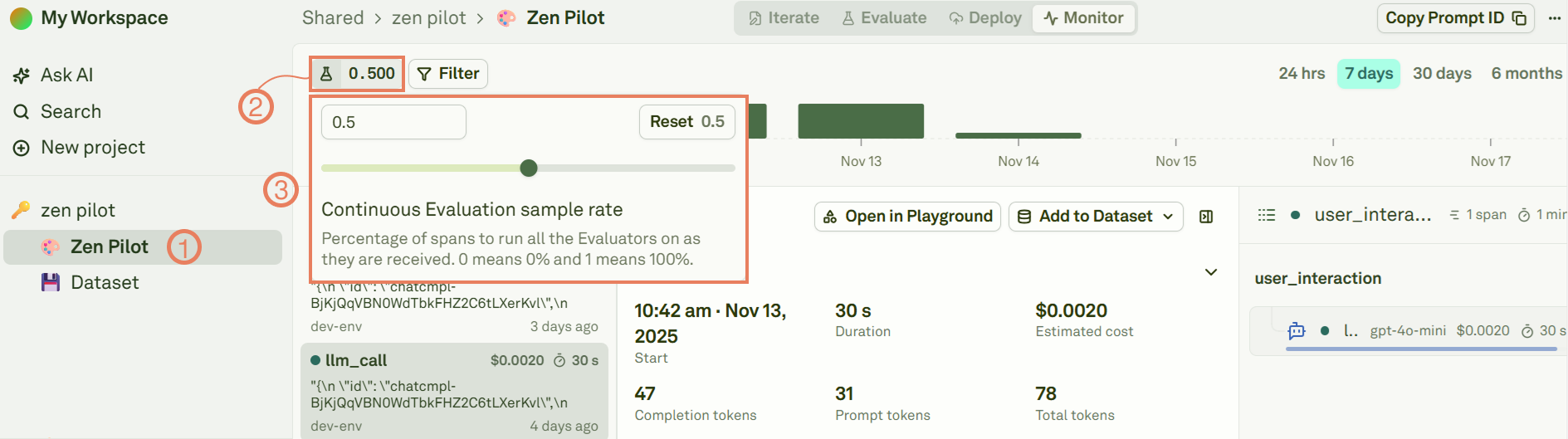 The continuous evaluation sample rate can have values included between 0 and 1, where:
- 0 means no logs will be taken into account for continuous evaluation.
- 0.5 means half of the logs randomly sampled will be taken into account for continuous evaluation
- 1 means all the logs will be taken into account for continuous evaluation.
Setup evaluators for the prompt, see Evaluators for more details.
Once the Evaluators and the sample rate are configured, all incoming spans associated with this prompt of type ‘Model’ (LLM calls) will have their ‘output’ values against the evaluators adhering to the sample rate. 
