

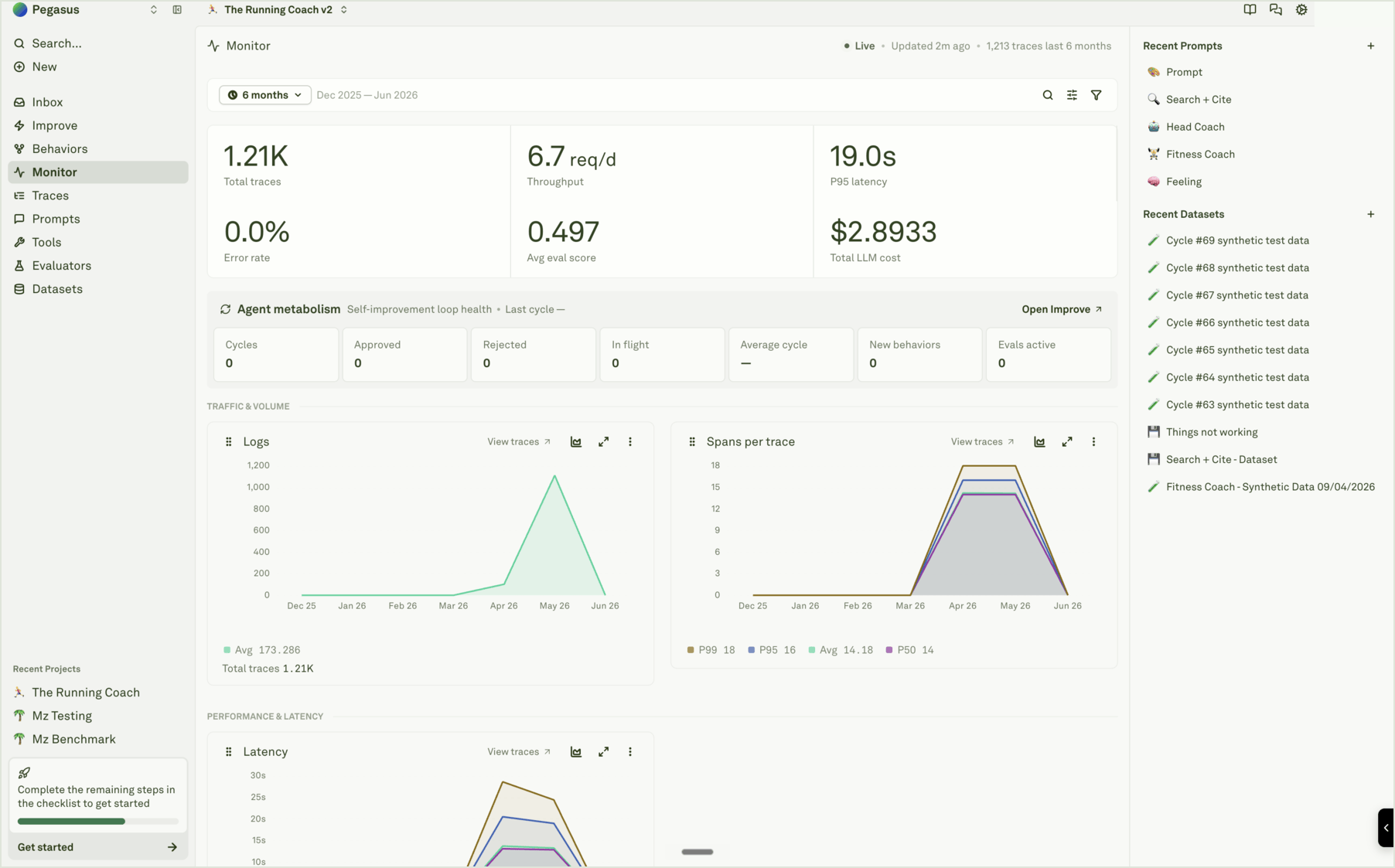
What Monitor shows
The top of Monitor answers the fastest operational questions:
The Agent metabolism panel shows the state of the improvement loop: cycles, approved cycles, rejected cycles, in-flight cycles, average cycle time, new Behaviors, and active evals. It is not only a dashboard card. It is a quick answer to “is the agent learning from production or just accumulating logs?”
Read it as a triage surface
Start broad, then open evidence:- Pick the time range that matches the release, incident, or customer report.
- Scan the KPI row for obvious movement in volume, latency, cost, errors, or eval score.
- Review the chart groups for the metric that moved.
- Use View traces from a chart, or open Traces, to inspect the exact requests behind the metric.
- If the pattern repeats, check Behaviors. If the fix belongs in the prompt, start or review an Improve cycle.
Dashboard sections
Monitor groups charts by the kind of decision they support:
For chart details, see Analyze log charts.